
How to Change the Case of Selected Text in the WPS Office Suite
CapitalizationYaron Elharar3 minute readPublished UpdatedWPS Writer has a Change Case dialog. Presentation uses Font → Effects → All Caps as a display effect. Spreadsheets use UPPER, LOWER, and PROPER. AnyCase adds Windows shortcuts.
Read more
How To Change The Selected Text Capitalization In Bluebeam Revu?
CapitalizationYaron Elharar4 minute readPublished UpdatedRevu 21 has no documented Change Case command. Select existing text and type a replacement. OCR makes scans searchable and selectable. AnyCase can convert selected text alongside Revu on Windows.
Read more
How To Change The Selected Text Case In CapCut on Windows
CapitalizationYaron Elharar4 minute readPublished UpdatedCapCut for Windows changes selected text from Text → Basic → Case: TT (uppercase), tt (lowercase), Tt (title case). AnyCase adds more in-place Windows shortcuts.
Read more
How To Convert Uppercase To Lowercase In Notepad
CapitalizationYaron Elharar3 minute readPublished UpdatedNotepad has no documented Change Case command. Copy into Word (Home → Change Case or Shift+F3), use Windows Voice Access, or AnyCase Windows shortcuts.
Read more
How To Change The Selected Text Case In AutoCAD Easily, Multiple Options
CapitalizationYaron Elharar4 minute readPublished UpdatedAutoCAD can change case from the Text Editor Formatting panel, Ctrl+Shift+U/L while editing, TEXTALLCAPS for new text, and TCASE on full Windows AutoCAD. AnyCase is optional for in-place Windows shortcuts.
Read more
How To Change The Selected Text Case In DaVinci Resolve Easily
CapitalizationYaron Elharar5 minute readPublished UpdatedDaVinci Resolve 21.1 has Font Case on Text titles and, since 18.6, on subtitle tracks. Fusion Text+ can use string.upper / string.lower. AnyCase is optional for other Windows fields.
Read more
How To Change The Capitalization, Or Case Of Selected Text In Notion
CapitalizationYaron Elharar4 minute readPublished UpdatedNotion has no dedicated Change Case command. Copy into Word (Home → Change Case or Shift+F3), ask Notion AI to rewrite a selection, or use AnyCase Windows shortcuts.
Read more
How To Change To All Caps In Windows File Explorer?
CapitalizationYaron Elharar4 minute readPublished UpdatedVanilla File Explorer has no uppercase or lowercase transform — only Rename (F2). PowerToys PowerRename is the Microsoft first-party bulk rename. AnyCase Win+Alt+U still works one filename at a time.
Read more
How To Change The Selected Text Case In Wondershare Filmora
CapitalizationYaron Elharar4 minute readPublished UpdatedCurrent Filmora for Windows has a letter case control in the Text properties panel. AnyCase is an optional Windows helper for extra styles and selection-level conversion.
Read more
How To Change The Selected Text Capitalization In ArchiCAD
CapitalizationYaron Elharar4 minute readPublished UpdatedArchicad 29 has no native Change Case for highlighted Text-tool text. UPPER() and LOWER() work in expressions, not on a selected Text or Label block. Copy into Word (Shift+F3) or use AnyCase on Windows.
Read more
How To Change The Selected Text Case In Foxit PDF Editor, The Easy Way!
CapitalizationYaron Elharar5 minute readPublished UpdatedFoxit PDF Editor has no Change Case command for selected PDF text. Use Edit Text, Search & Replace (Ctrl+T), or Word. AnyCase can help with editable text in PDF Editor, not Reader page content.
Read more
How To All Caps In Windows Microsoft Edge?
CapitalizationYaron Elharar3 minute readPublished UpdatedMicrosoft Edge has no native command that converts selected text to uppercase or lowercase. Caps Lock only affects new typing. On currently supported Edge, use Windows 10 or 11 with AnyCase for in-place conversion.
Read more
The Super Easy Way To Change Capitalization Directly In Autodesk Revit
CapitalizationYaron Elharar4 minute readPublished UpdatedRevit 2027 has All Caps formatting for Text Notes (Ctrl+Shift+A), not general Change Case across parameter fields. AnyCase converts selected editable text while you work in Revit on Windows.
Read more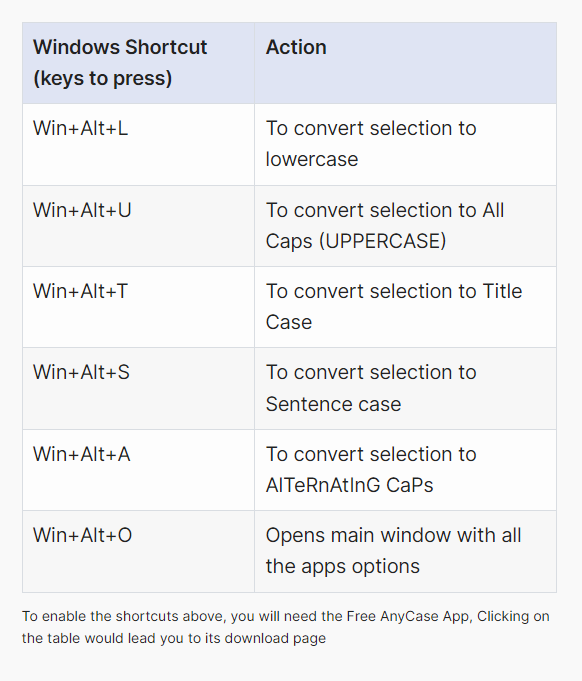
Is There A Way To Convert Uppercase To Lowercase In PDF Documents?
CapitalizationYaron Elharar5 minute readPublished UpdatedAcrobat still has no documented Word-style Change Case command. Open a PDF in Word, run OCR on scans, or convert selected editable text with AnyCase on Windows. Acrobat 2015, 2017, and 2020 are end-of-life.
Read more
How To Change The Case Or Capitalization Of Selected Text In Obsidian
CapitalizationYaron Elharar5 minute readPublished UpdatedObsidian has no documented core command for converting selected note text. Install Change Case from Community plugins, or optionally use Word or AnyCase on Windows.
Read more
How To Change The Selected Text Case In Sublime Text, Two Key Methods
CapitalizationYaron Elharar3 minute readPublished UpdatedSublime Text converts selected text via Edit → Convert Case, including identifier cases since Build 4142. Ctrl+K sequences are Windows/Linux defaults. AnyCase is an optional Windows helper at $24/year.
Read more
How to Assign Your Custom Shortcuts in AnyCase for Windows
CapitalizationYaron Elharar3 minute readPublished UpdatedReplace the default Win+Alt shortcuts in Customize Shortcuts. Ctrl+Alt is one example format, not the only one.
Read more
