
Change case in countless Windows programs.
- 1Select any text in the Windows program you are already using.
- 2Convert it in place — uppercase, lowercase, title case, and more.
- 3Keep working. No copy, no paste, no extra window.
AnyCase changes selected text in the Windows program you are already in — Word, browsers, email, Excel, and hundreds of others.
Highlight, convert, and keep typing. You do not copy text into another window.
What’s the difference between the Free and Pro versions?
Both free and pro have unlimited conversions. The free version includes a short delay between conversions.
Supports Windows 11, 10, 8.1, 8 | Latest Version: v14.41

Will it work in my program?
Can't find program? AnyCase often works anyway. Try it!
Need a one-off conversion?
Paste text here to change case in your browser. This web tool is for one-off paste-and-convert — it does not change text inside other programs.
15 words · 80 characters
Do this often? Convert in place in countless Windows programs.
From Frustration to Freedom in 0.2 Seconds
AnyCase App
Online/Manually
One Tool, a Solution for Countless Professionals
- Documents
- Research & dataset entries
- Marketing materials
- File and folder names
- Emails
- Warehouse and supply chain
- Component and inventory labels
- Financial reports and invoices
- Annotations and Technical drawings
- Legal documents
- Presentations
- Standardizing government applications
- Construction project specifications
- and more...
Exactly What You Need, at the Right Time!
Multi-Program In-place Case Conversions
The AnyCase App converts directly in place in countless programs. Search for your program above or view a partial list of supported programs.
Convert Using Shortcuts Anywhere
Get into countless Windows programs and use AnyCase's global shortcuts to convert case directly where you work.
Quick Replace
Quickly replace any character or word when you convert, for example replace space with hyphen: "My file example.pdf" to "My-File-Example.pdf".
Superscript and Subscript
Change text to superscript or subscript directly in place.
Paste In Blocked Fields
Paste in websites, fields, and programs that prevent you from using Ctrl+V.
Customize Global Shortcuts
Define your own custom shortcuts for case conversions.
Count The Words
Count the words and characters in the selected text.
Multiple Ways To Convert The Text Case
AnyCase comes with 3 different ways to convert text case: the main program window, a context menu, and global shortcuts that work in hundreds of applications.
Custom Capitalization Of Specific Words
Capitalize specific words exactly how you need them: your full name, a business name, a product name, etc. Include words that need to be capitalized exactly the same every time.
Switch Language After Typing
Change the text language after you already started typing, from gibberish to the intended language.
Remove Doubles Spaces
Automatically remove double spaces in the converted text.
Multi-language Support
AnyCase can convert the text case in place in over +24 languages.
Capitalize Brand Names
Automatically identify and capitalize brand names (paypal → PayPal, etc.).
Capitalize Personal Names
Automatically capitalize personal names (Hi james → Hi James).
Punctuation Engine
AnyCase punctuation engine catches over 30 common punctuation issues and automatically fixes them.
Capitalize Days and Months
Automatically capitalize days and months.
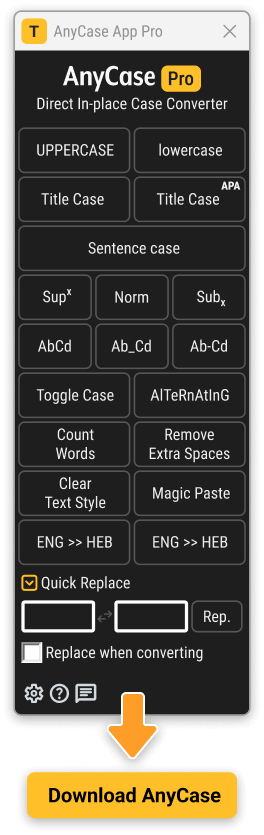
How Does It Work in Practice?
When AnyCase is opened, its window will appear and will include the text conversion functionality as well, in addition in this window you can access the AnyCase settings/options for additional customization.
To change text from UPPERCASE to lowercase for example, you will go through the same process: first select the text you would like to change the capitalization for, then choose one of the options.
All the conversions work in a fraction of a second.
See each feature in action
AnyCase has a right-click menu that works in all supported programs for quick case conversions. Select any text in the program you are currently working in, then press Shift+{right-click} to open the AnyCase conversion menu.
Shift+{right-click} – Will open the global context menu so you can easily select a conversion option from a list.
The AnyCase App enables a global set of shortcuts that work across applications and programs. Use these shortcuts to change the capitalization of the selected text in supported applications. You can also define your own key combinations.
Win+Alt+L – To convert selection to lowercase
Win+Alt+U – To convert selection to UPPERCASE
Win+Alt+T – To convert selection to Title Case
Win+Alt+S – To convert selection to Sentence case
Win+Alt+A – To convert selection to AlTeRnAtInG CaPs
Win+Alt+O – Opens main window with all the apps optionsEasily change text to Superscript or Subscript directly in-place, whether you need it for mathematical use, chemistry, physics, or cataloging and notations. You can also define your own custom shortcuts for the conversion.
If you start typing in the wrong language, this feature flips the text to the language you intended without retyping.
Quickly replace any character or word with another. For example, replace every space with a hyphen (-) or underscore (_) while you convert file names.
Set words you want capitalized in an exact manner, such as a brand or company name (“arctic ice inc.” always becomes “Arctic Ice Inc.”).
AnyCase applies these preferences when you use Sentence Case or Title Case.
Copy with Ctrl+C, then use AnyCase Magic Paste when a website or field disables Ctrl+V.
Press Shift + {Mouse Right Click} and select Magic Paste in the context menu that appears.
A context-menu feature that counts how many words are in the selected text.
This feature eliminates any double spaces in the selected text. For example, it changes 'My beautiful text' to 'My beautiful text'.
AnyCase App, A Powerful Case Converter For Windows
Click The Download Button > Double-click The File and Follow the instructions > and your Done!
In-place conversions is now available in hundreds of applications across windows
Supports Windows 11, 10, 8.1, 8
Automatic Proper Nouns Converter
The AnyCase App's extensive proper noun engine contains thousands of proper nouns, automatically capitalizing them when you convert between uppercase, title case, lowercase, sentence case, etc. With AnyCase, 90% of the time, you don't need to worry about the capitalization of brand names, personal names, countries, days of the week, and months, as it handles these automatically.
- Brand/Company Names – eBay, CNN, CloudFlare, Starbucks
- Personal Names – David, Mary, Kate
- Days Of The Week – Sunday, Monday, Tuesday
- Months – January, February, Mar. Apr.
- Holidays – Christmas, Ramadan, Hanukkah
- Religions – Christianity, Judaism, Islam
- Languages/Nationalities – English ,American, Japanese, Swedish
- Countries/States – USA, United States, West Virginia, Texas, Hawaii
- Cities – New York, Tokyo, Tel-Aviv
- Common geographic locations – Mountains, Rivers, Waterways Etc.
- Historical Periods/Events – World War II, D-Day, Korean War
* Setting is customizable
Punctuation Engine
The AnyCase App punctuation engine identifies and corrects over 30 common punctuation issues automatically. These include correcting a missing space after a comma, addressing double or triple spaces within a paragraph, and removing an extraneous dot appearing directly after a question mark. For instance, 'Would you be in tomorrow?.' would be corrected to 'Would you be in tomorrow?'.
* Setting is customizable
AnyCase Supports Countless Windows Programs
Below is a partial list of programs AnyCase supports. Changes made in the latest versions of AnyCase mean that countless desktop programs are now supported, including most likely the one you use. This change makes it possible to convert text in countless Windows programs.
Browser Support (No extensions required)
- Google Chrome
- Mozilla Firefox
- Opera
- Microsoft Edge
- Internet Explorer
- Vivaldi Browser
CMS's Support
- WordPress
- Joomla
- Drupal
- Progress Sitefinity
Document Writing / Presentations / Publishing Software / Research Software
- Microsoft 360
- Microsoft Word (App + in browser)
- Microsoft PowerPoint (App + in browser)
- Microsoft Excel (App + in browser)
- Microsoft Publisher
- OneNote (App + in browser)
- Google Docs
- Google Slides
- Google Spreadsheets
- OpenOffice Writer
- OpenOffice Calc
- OpenOffice Impress
- OpenOffice Draw
- Evernote
- Grammarly
- EndNote
- iA Writer
- Affinity Publisher
- Scribus
- LucidPress
- Bibisco
- Writemonkey
- miro (collaborative whiteboard)
- QuarkXPress
E-commerce site support / Web shops / Website Builders
- WooCommerce
- Squarespace
- Shopify
- MonsterCommerce
- Wix
- InfusionSoft
- Marketo
Marketing (Email Marketing, Social Media Marketing Etc.)
- HubSpot
- Marketo
- InfusionSoft
- AWeber
- MailChimp
- Constant Contact
3D Software
- AutoCAD
- Maya
- Houdini
- Cinema 4D
- Autodesk 3ds Max
- Modo
- Lightwave 3D
- Blender
- Daz Studio
- SketchUp
- Houdini Apprentice
Warehouse Management
- SAP Warehouse Management
- SAP Extended Warehouse Management
- 3PL Central
- Manhattan Warehouse Management
- Oracle Warehouse Management Cloud
- Odoo
- JDA Warehouse Management
- Manhattan Associates PkMS
- Epicor Prophet 21
- Fishbowl Inventory
- And other WMS's
Accounting
- QuickBooks
- XERO
- Wave Financial
- FreshBooks
- Plooto
- Oracle Netsuite
- Zoho Books
- Melio
Messaging applications
- Discord (App + in browser)
- Skype
- Zoom (App + in browser)
- WhatsApp Desktop
- Facebook Messenger (App + in browser)
- Google Hangouts
- Slack (App + in browser)
Social Media Support (Posts / Content):
- Facebook Messenger (App + in browser)
- Instagram (App + in browser)
- Telegram (App + in browser)
- Reddit (App + in browser)
Email's Applications Support
- Gmail
- Microsoft Outlook (App + in browser)
- Mozilla Thunderbird
- Yahoo Mail
- AOL Mail
- eM Client
- Spike
- Protonmail
Design Applications
- Adobe In-design
- Adobe Photoshop
- Other CC applications
- Affinity Designer
- CorelDRAW Graphics Suite
- Autodesk SketchBook
- Paint.NET
- GIMP
- Inkscape
Miscellaneous
- Microsoft To-Do
- Notepad++
- Visual Studio Code
- PDF Reader
Languages Supported
AnyCase App supports Case conversion in multiple languages, as it complies with the Unicode standard, some of the languages supported by AnyCase are:
- English
- German
- Swedish
- French
- Dutch
- Spanish
- Russian
- Slovenian
- Danish
- Croatian
- Norwegian
- Polish
- Indonesian
- Tagalog
- Filipino
- Tajik
- Italian
- Czech
- Romanian
- Portuguese
- Irish
- Icelandic
- Faroese
- Finnish
In addition the AnyCase App (v4 and above) can convert directly in place diacritical letters, ligatures, and digraphs. and all supported application, a few examples are included in the table below.
| Language | Supports For Diacritical Letters, Ligatures, And Digraphs |
|---|---|
| French | À ⇆ à | Â ⇆ â | Ç ⇆ ç | É ⇆ é | È ⇆ è | Ê ⇆ ê | Ë ⇆ ë | Î ⇆ î | Ï ⇆ ï | Ô ⇆ ô | Ù ⇆ ù | Û ⇆ û | Ü ⇆ ü | Ÿ ⇆ ÿ |
| Dutch | Ä ⇆ ä | É ⇆ é | È ⇆ è | Ë ⇆ ë | Ï ⇆ ï | Ö ⇆ ö | Ü ⇆ ü |
| German | Ä ⇆ ä | Ö ⇆ ö | Ü ⇆ ü |
| Italian | À ⇆ à | È ⇆ è | É ⇆ é | Ì ⇆ ì | Ò ⇆ ò | Ù ⇆ ù |
| Portuguese | Ã ⇆ ã | Õ ⇆ õ | Á ⇆ á | É ⇆ é | Í ⇆ í | Ó ⇆ ó | Ú ⇆ ú | Â ⇆ â | Ê ⇆ ê | Ô ⇆ ô | À ⇆ à | Ç ⇆ ç |
| Afrikaans | Á ⇆ á | É ⇆ é | È ⇆ è | Ê ⇆ ê | Ë ⇆ ë | Í ⇆ í | Î ⇆ î | Ï ⇆ ï | Ó ⇆ ó | Ô ⇆ ô | Ú ⇆ ú | Û ⇆ û | Ý ⇆ ý |
| Catalan | À ⇆ à | É ⇆ é | È ⇆ è | Í ⇆ í | Ï ⇆ ï | Ó ⇆ ó | Ò ⇆ ò, Ú ⇆ ú | Ü ⇆ ü | Ç ⇆ ç |
| Ligatures/Digraphs | Ꜳ ⇆ ꜳ | Æ̀ ⇆ æ̀ | Ꜵ ⇆ ꜵ | Ꜷ ⇆ ꜷ | Ꜽ̣ ⇆ ꜽ̣ | IJ ⇆ ij | Œ ⇆ œ | Ꝏ ⇆ ꝏ | Ꝡ ⇆ ꝡ |
F.A.Q's
Change log
AnyCase App v14.41 – (Download)
- Major Update (Free)– Note that all older AnyCase App versions must be updated to this version for them to continue working properly.
- Updated– Window management system for better positioning and control
- Improved– Even more programs supported by AnyCase App, plus programs that were not supported before are now working.
- Improved– APA/title case handling across locales and fixed APA hyphen capitalization boundaries.
- Improved– Support for Google Docs.
- Improved– Excel identification and conversion support.
- Improved– Clipboard normalization flow for case conversions with better line-break preservation.
- Improved– Improved handling of HTML Conversion.
- Improved– Signature verification compatibility and cleanup reliability.
- Improved– Removed legacy dependencys.
- Improved– No-internet mode handling of errors and defaults.
- Improved– Update check/download handling.
- Improved– Support for the Turkish language when converting
- Fixed– Under some rare scenarios the AnyCase window would not open.
- Fixed– Camel/Snake/Kebab HTML conversion issues, including entity placeholder restoration.
- Fixed– Messages would sometimes appear behind the main window.
- Fixed– Tray behavior and synchronization.
- Fixed– Custom capitalization additions now guard against empty selections.
- Fixed– Context menu notification when no text is copied.
- Fixed– Flip-language fallback for unmappable characters now sends the current character correctly.
- Fixed– Restoring/opening AnyCase from tray no longer causes an unrelated window to be brought to the foreground.
- Fixed– in rare cases CapsLock popup would remain near the mouse even though CapsLock was no longer pressed.
AnyCase App v14.04
- Behavior change– Version 14 switches to delayed but unlimited usage for free users
- Updated– More programs supported for direct conversion through multiple code improvements
- Updated– Sentence case handling with additional quotation and punctuation rules
- Updated– Complete rewrite of no internet behavior. messages should now rarely show up
- Updated– Update checking system with improved offline handling
- Updated– Window management system for better positioning and control
- Improved– Pro version program recovery
- Improved– Escape key shortcut to close settings window
- Improved– License activation system with better user management
- Improved– Program memory usage and window handling
- Improved– Overall application stability and performance
- Improved– Error handling for license-related operations
- Improved– Window positioning and focus management
- Improved– Deals checking system through
- Improved– Automatic focus on license key input when opening license window
- Improved– Hover tooltips functionality for deals and settings sections
- Fixed– Fix is an issue where the context menu wouldn't open some 64-bit systems
- Fixed– Interface stuttering issues when dragging windows
- Fixed– Popup windows displaying incorrect text or dots instead of content
- Fixed– Code messages cleanup
- Fixed– License expiration messages showing wrong information
- Fixed– Usage calculation for deal eligibility accuracy
- Fixed– Language switching issues after text input
- Fixed– Start-to-tray functionality for premium users
- Fixed– Tooltip positioning to remain within program window
- Fixed– Multiple popup windows opening simultaneously
- Fixed– Random window activation issues
- Fixed– User preferences loading under specific scenarios
AnyCase App v13.08
- Recommended free update
- Improved– Significantly improves the quick replace functionality.
- Improved– Improved custom capitalization.
- Improved– Sentence case capitalization.
- Improved– File handling for custom capitalization.
- Maintenance– Multiple bugs are fixed in this release.
AnyCase App v13.02
- Added– Installer updated to support businesses IT department requirements, such as Admin installation, installation location, and command line parameters for easier deployment. Thanks IT department at ZS engineering.
- Added– You can now minimize and maximize the AnyCase window to the taskbar, in addition to using the X to move it to tray.
- Added– A Screen presenting the less known CapsLock indicator feature, with an off and on choice.
- Added– Image to better explain the CapsLock feature in the settings area.
- Added– When the AnyCase App window is open, it will now appear in the Taskbar as well.
- Added– AnyCase App will now try to keep the text selection even if the selection was made before opening the application window.
- Added– Better support for multi-language options.
- Updated– Settings area, text, appearance and explanations updated.
- Updated– Version increases the amount of programs supported by AnyCase App in multi-language environments
- Updated– All interfaces updated for better readability.